How Openr works
Openr takes product, cost and recipe data from the systems you already run, masters products, prices and menus in one place, and publishes them to your POS and customer-facing ordering channels.
At a glance
Recipe and cost systems → Openr (product, pricing, menus on a common data model) → POS, customer-facing ordering channels, digital boards, print
In
Recipe and cost systems
- Fourth
- Procure Wizard
- Assure 65
Common data model
Out
- POSOracle Simphony · Zonal
- Customer-facing ordering channels
- Website
1. Bring your data in
Openr takes data from the systems that already hold it
Products, recipes and cost prices come in from your recipe and procurement systems, so nobody types them in again.
| Source | Systems |
|---|---|
| Recipe and cost |  StarChef  Assure 65 |
| POS (existing products and prices) |   |
How data is ingested from each source
Openr connects to your recipe and cost systems through their APIs. Products, recipes, modifiers, allergens and cost prices come across as structured data, with no CSV exports and no re-keying. For your POS, Openr reads the existing products and prices once at set-up, so you start from what's already in the till rather than a blank page.
How often it refreshes
Recipe and cost data syncs automatically as often as you choose. When a cost price moves in your recipe system, the new cost shows up next to the price in Openr and in price modelling, so you see the margin change before you decide what to do.
2. Master it once
Products, prices and menus are each managed in one place
Product
One product library holds every item, modifier, bundle and allergen, and it's pushed into your POS separately from the menus built on top of it.
Pricing
Prices are set by site, region, channel, day-part or event, using price bands, and changes can be scheduled ahead and rolled back.
Menus
Menus are built from the product library for every brand, format and channel, including seasonal, day-part and limited-time menus.
Approvals
Changes are prepared, checked and then published as a deliberate step. Nothing reaches a publishing channel until someone with publish permissions reviews and confirms it.
User roles
Give each team the access it needs with fully configurable roles & permissions. Finance can model and propose prices, the menu team can build and schedule menus, and only named users can publish to the estate. Access can be limited by brand, by site or by region.
Audit trail
Every change is recorded: what changed, who changed it, when, and where it was published. Price history runs from the day you go live, so you can answer "what was this item priced at in Leeds last March?" in seconds.
3. One common data model
Every system's data is mapped to one canonical model
Each POS and channel describes products and prices differently. Openr maps them all to one common data model for hospitality, so a product or price is defined once and translated for each system on the way out. Like the Gastronorm pan standardised the kitchen, the data model makes your data fit every system.
Common data model
Chicken burger
- Price band B
- £8.79
- Modifiers
- 3 groups
- Allergens
- Gluten, egg, mustard
- Channels
- Till, app, delivery
In the POS
CHKN BURGER · PLU 4102 · £8.79
In a delivery channel
Chicken Burger
Crispy chicken, house slaw, brioche bun · Contains gluten, egg, mustard
The main entities in the data model
- Products. Every item, modifier and bundle, with its recipe, allergens and a POS ID. A product can carry channel-specific details, such as a different name, description or image for delivery.
- Venues. Every site, arranged in one hierarchy by brand, region and format.
- Price bands. Groups of venues that share prices. Each venue sits in one band, and each product gets one price per channel in that band.
- Channels. The till, kiosk, app, website, delivery platforms, digital boards and print.
- Menus. What's on sale where and when, built from the product library with sections, day-parts and timetables.
Define each one once in Openr. Openr translates it into whatever format each POS and channel expects.
4. Publish everywhere
Changes go out to the POS and every channel
When a price, product or menu changes, Openr publishes it to your POS, customer-facing ordering channels, digital boards and print. Before anything goes out, it checks for missing prices, POS IDs, tax rates and delivery platform rules.
| Destination | Systems |
|---|---|
| POS | |
| Delivery channels |     |
| Design tools |  |
| Website CMS |   |
| Listings |  Google, Apple Maps and Bing |
| In progress |  kiosk  delivery  ordering |
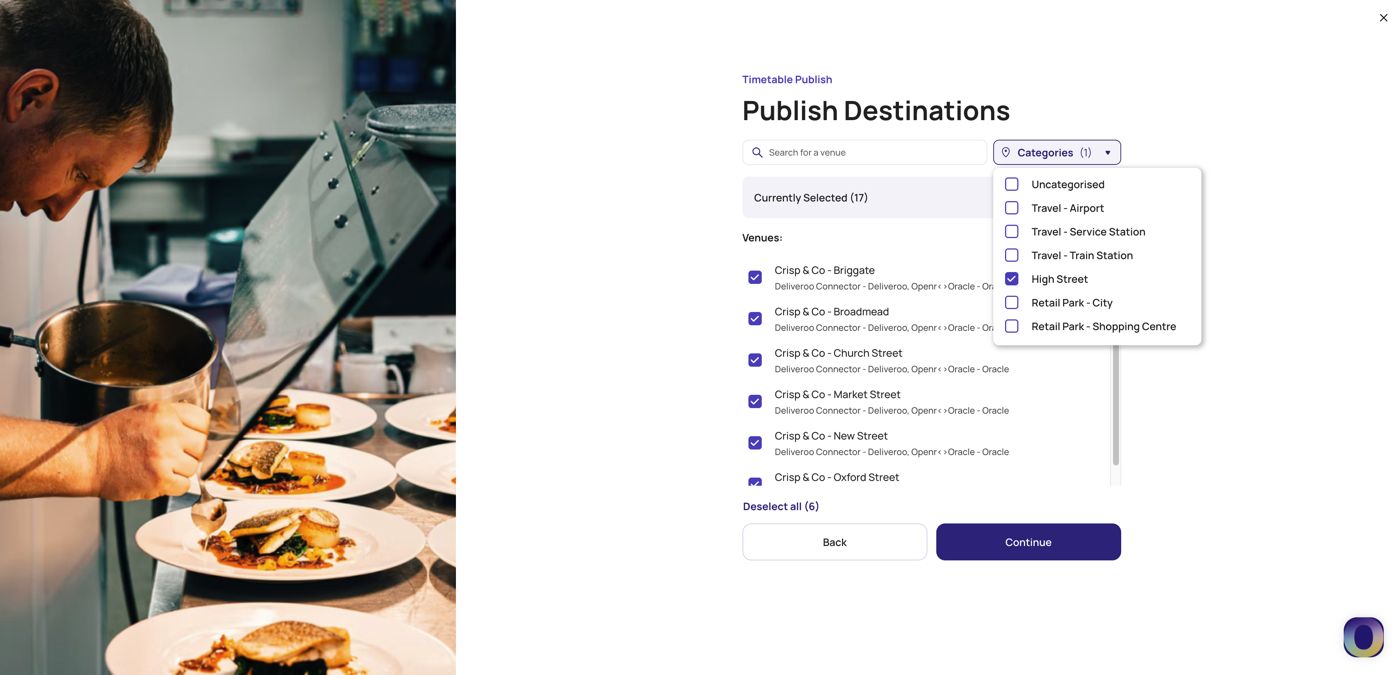
How a change is confirmed as landed
Before anything goes out, Openr checks for missing prices, POS IDs, tax rates and platform rules, and shows you exactly what will change. After you publish, Openr tracks each destination and reports back by site and channel, so you know the change has landed and see straight away if one hasn't.
And how rollback works
If a change doesn't perform or something looks wrong, put the previous prices or menu back in one step, across the same sites and channels.
Example: Burger King UK

Burger King UK connects Fourth and Oracle Simphony through Openr
Products flow from Fourth into Openr, and prices and product details flow from Openr into Oracle Simphony, live across 296 sites in 4 weeks.
Security and data
How Openr hosts and protects your data
Hosting
Openr runs on Amazon Web Services, hosted in the UK & the EU. Your data is backed up automatically and encrypted at rest and in transit.
Security
Openr runs a security programme aligned to SOC 2 and ISO 27001, with controls monitored continuously through our compliance platform.
Access to customer data is limited to named staff, protected by single sign-on and multi-factor authentication, and reviewed regularly.
Your team can sign in with your own identity provider through SSO.
Security documentation is available on request.
Data protection
Openr holds product, recipe, price and menu data, plus the details of the people who use the platform. It does not process guest or payment data. We act as a data processor under UK GDPR and EU GDPR, with a data processing agreement in every contract.
For developers
API documentation and integration guides are on the Openr Developer Portal.